Appointment Scheduling
Square to Tebra Appointment Sync
Every Square booking lands in Tebra automatically. New patients get a fresh record. Returning patients get their existing chart updated. Your front desk touches none of it.

Square
→

Keragon
→

Tebra (Kareo)
Most practices using Square for booking still have someone manually re-entering that appointment into Tebra. It takes time, creates duplicates, and when a returning patient gets a new chart, someone has to clean it up later. There's no reason this should still be a manual job.
Who this is for
This template is built fo you if:
- You use Square for patient booking and Tebra (formerly Kareo) as your EHR
- You run a medical spa, therapy clinic, private practice, or outpatient facility
- Your front desk is manually re-entering bookings into your patient management system
- You've dealt with duplicate patient records and know exactly how they happen
How it works
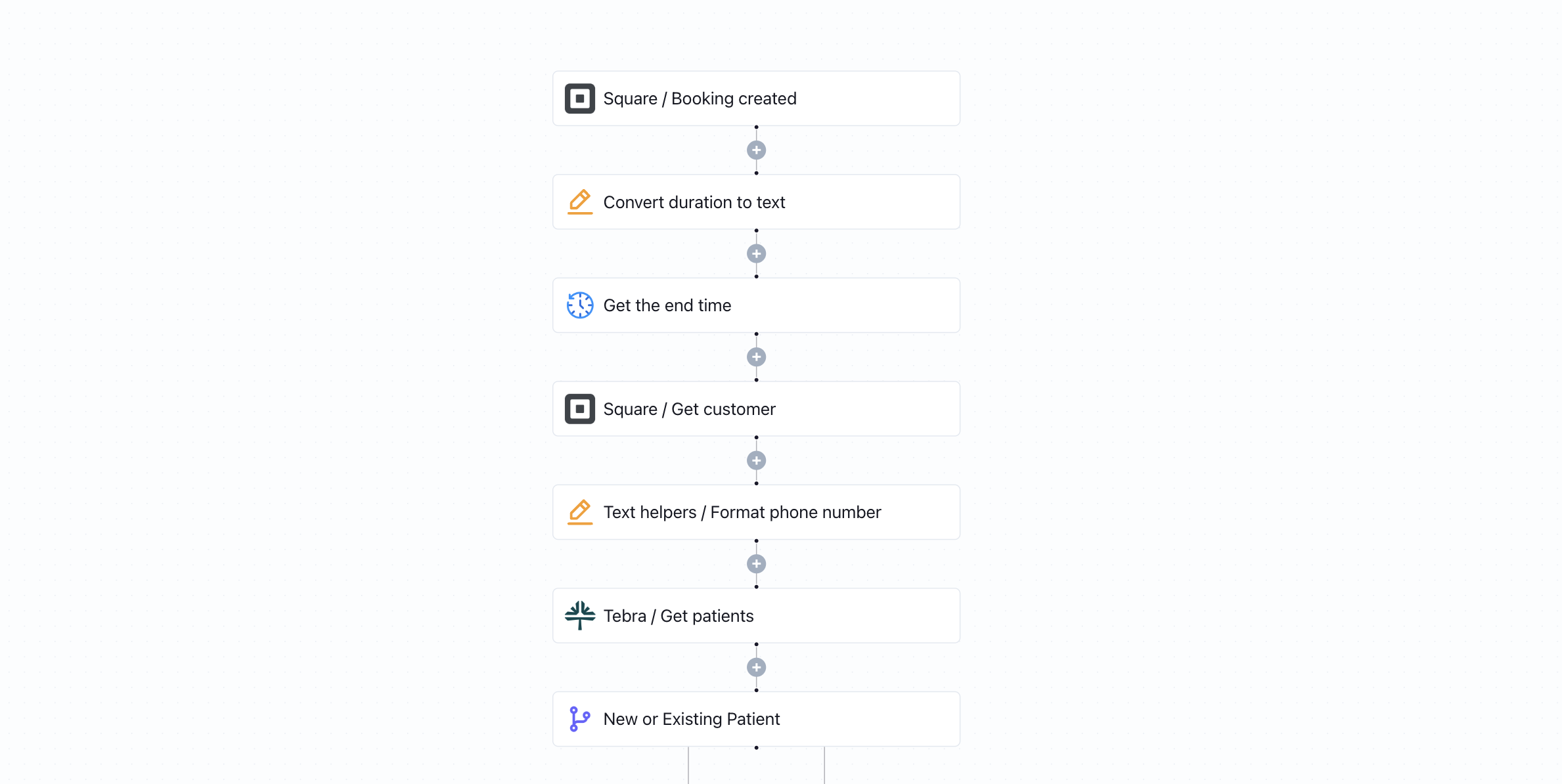
- A new booking is created in Square
- Keragon checks whether this patient already exists in Tebra
- If new → creates their patient record and schedules the appointment
- If returning → updates their info and adds the appointment to their existing chart
- Done. No manual entry. No duplicate records.
Key benefits
- Your front desk stops touching this entirely
- New and returning patients are always handled correctly — no duplicates
- Phone numbers and appointment durations are auto-formatted for Tebra
- Every booking is linked to the right patient chart, in real time
- Works from day one — no custom development required
How to get started
1
Click 'Try it now'
The template is copied into your Keragon account. No account yet? You'll be prompted to create one free.
2
Connect Square and Tebra
Authenticate both accounts in a few clicks. No code required.
3
Publish and go live
One-click publish. Your workflow runs automatically from the first booking.
More templates by
Keragon

Keragon
Square to Tebra Appointment Sync
Keragon
AdvancedMD to Spruce Health: Appointment-Based Messaging
Keragon
Jotform to Zenoti Appointment Scheduling
More templates by
Appointment Scheduling
Keragon
Square to Tebra Appointment Sync
Keragon
Jotform to Zenoti Appointment Scheduling
Keragon
Optimantra to Jotform Real-Time Calendar Sync
Related templates
Keragon
Square to Tebra Appointment Sync
Keragon
Jotform to Cerbo Patient Encounters
Keragon
Jotform to AdvancedMD Appointment Scheduling