Patient Intake
Jotform to Athenahealth Patient Intake Sync
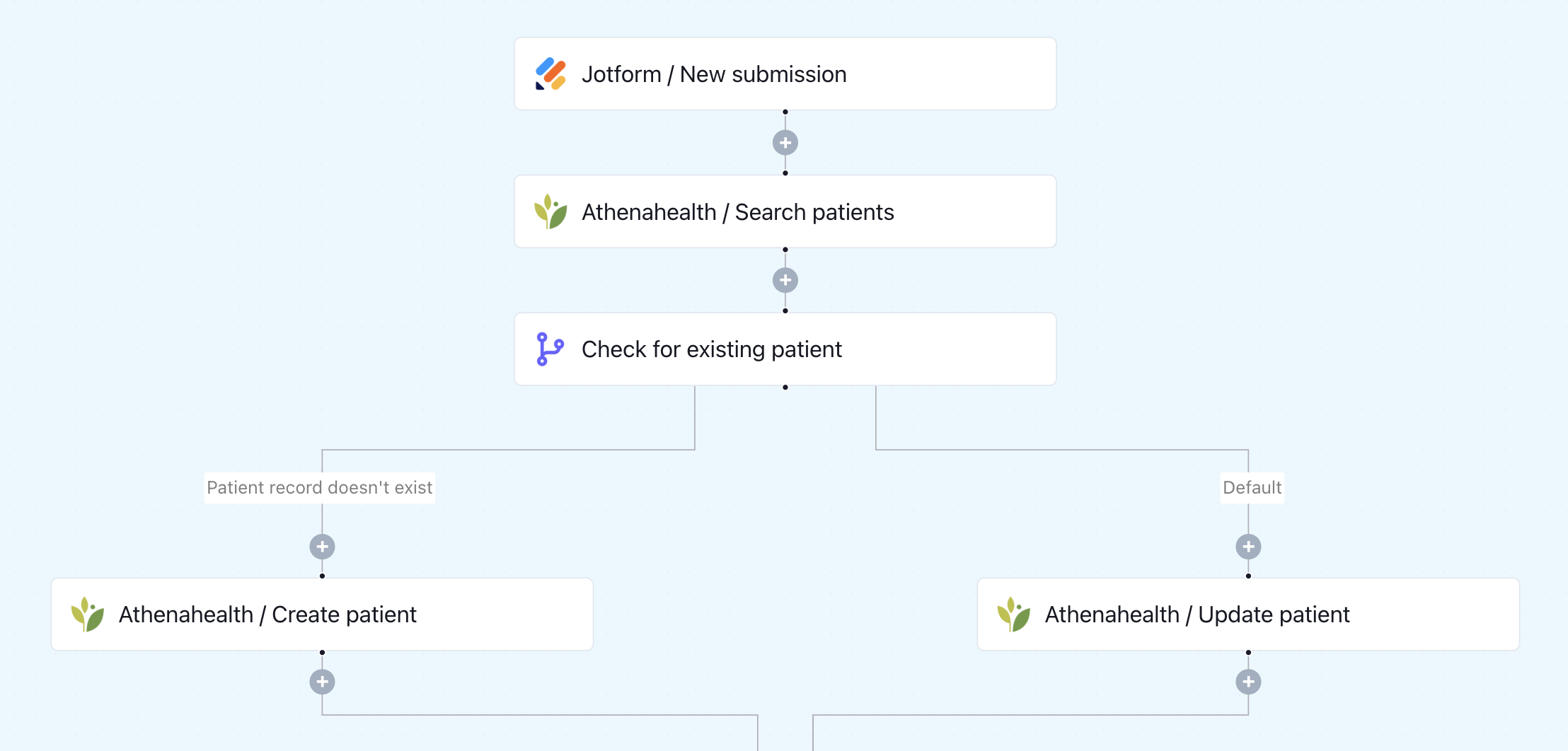
When a patient submits a Jotform, this workflow checks if they already exist in Athenahealth. It updates existing records or creates a new one - no manual data entry needed.
Jotform
→
Keragon
→

Athenahealth
Your intake forms come in through Jotform but someone still has to manually enter that data into Athenahealth. That shouldn't be anyone's job.
Who this is for
This template is built fo you if:
- You use Jotform for patient intake and Athenahealth as your EHR
- Your front-desk team is manually transferring form data into patient records
- You want to prevent duplicate records and data inconsistencies in Athenahealth
- You're a small-to-mid-sized practice that needs reliable intake automation without IT resources

How it works
- A patient submits your Jotform intake form
- Keragon checks whether the patient already exists in Athenahealth
- If the patient is new, a complete profile is created in Athenahealth using the form data
- If the patient already exists, their record is updated with the latest submitted information
- Everything runs instantly — no manual steps required
Key benefits
- Manual entry between Jotform and Athenahealth is completely eliminated
- New patients are onboarded instantly from form submission to EHR record
- Returning patients always have current, accurate data in Athenahealth
- Fully HIPAA-compliant with no code required
How to get started
1
Click “Run this workflow”
You’ll be prompted to sign up or log in to your Keragon account. Once inside, you’ll land on your dashboard with a pre-filled prompt in the AI chat.
2
Generate the workflow with AI
Click the CTA in the chat to let Keragon AI build the workflow for you automatically - no manual setup needed.
3
Review and publish
Once the workflow is generated, configure and review it in the canvas, then publish with one click. Your automation will start running immediately.
Your AI prompt
This prompt will be automatically loaded in Keragon AI. Simply run it to generate your workflow, or copy and customize it first.
I use Jotform to collect patient intake information and Athenahealth as my EHR.
When a patient submits my intake form, I want Keragon to check whether that patient already exists in Athenahealth.
If they're a new patient, create a new patient profile using the information from the form — including name, date of birth, phone number, email, and address.
If they're a returning patient, update their existing record with the latest information from the form. No manual data entry.
I use Jotform to collect patient intake information and Athenahealth as my EHR.
When a patient submits my intake form, I want Keragon to check whether that patient already exists in Athenahealth.
If they're a new patient, create a new patient profile using the information from the form — including name, date of birth, phone number, email, and address.
If they're a returning patient, update their existing record with the latest information from the form. No manual data entry.
Square to Tebra Appointment Sync
AdvancedMD to Spruce Health: Appointment-Based Messaging
Jotform to Zenoti Appointment Scheduling
Jotform to Cerbo Patient Encounters
Healthcare Booking Automation
Typeform to Canvas Medical Patient Intake Sync