


Healthie to Quickbooks: Automated Invoice Sync for Patient Billing
When a Healthie session is complete, the invoice writes itself in QuickBooks.
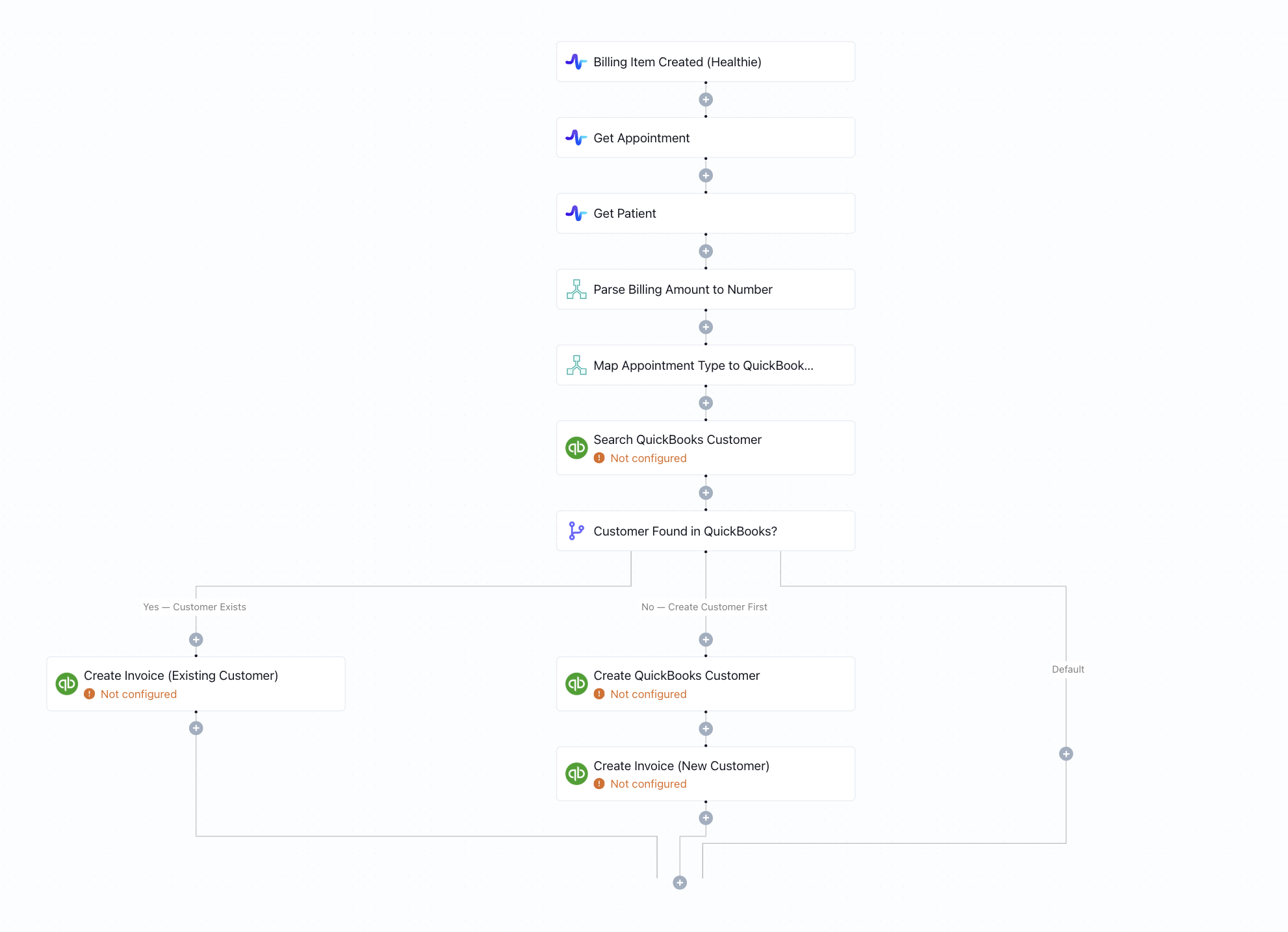
Click to expand
How the automation runs
- An appointment or billing event is triggered in Healthie
- Keragon retrieves the patient and session details from Healthie
- The workflow searches QuickBooks for an existing customer record for that patient
- If the customer exists, an invoice is created against their record; if not, a new customer is created in QuickBooks first
- The invoice is posted in QuickBooks with all relevant billing details from the Healthie session
Is this for you ?
- You use Healthie for clinical operations and QuickBooks for billing and accounting
- Your billing team is manually creating invoices in QuickBooks from Healthie session data
- You want to close the gap between clinical care and financial records automatically
- You're a solo provider or small practice looking to cut billing admin overhead



More templates by
Keragon
More
Billing & Insurance
templates
Related templates
































FAQ
No items found.