We've raised a total of $10.5M to bring automation to healthcare.
Read more

Daily Oura-to-Healthie Sync: Auto-Log Wearable Vitals in Patient Chart

Daily Oura-to-Healthie Sync: Auto-Log Wearable Vitals in Patient Chart

Every day, this workflow pulls the previous day’s Oura Ring data - sleep, activity, vitals - and logs a summary note directly in a patient’s Healthie chart for continuous, hands-off monitoring.
What this workflow does

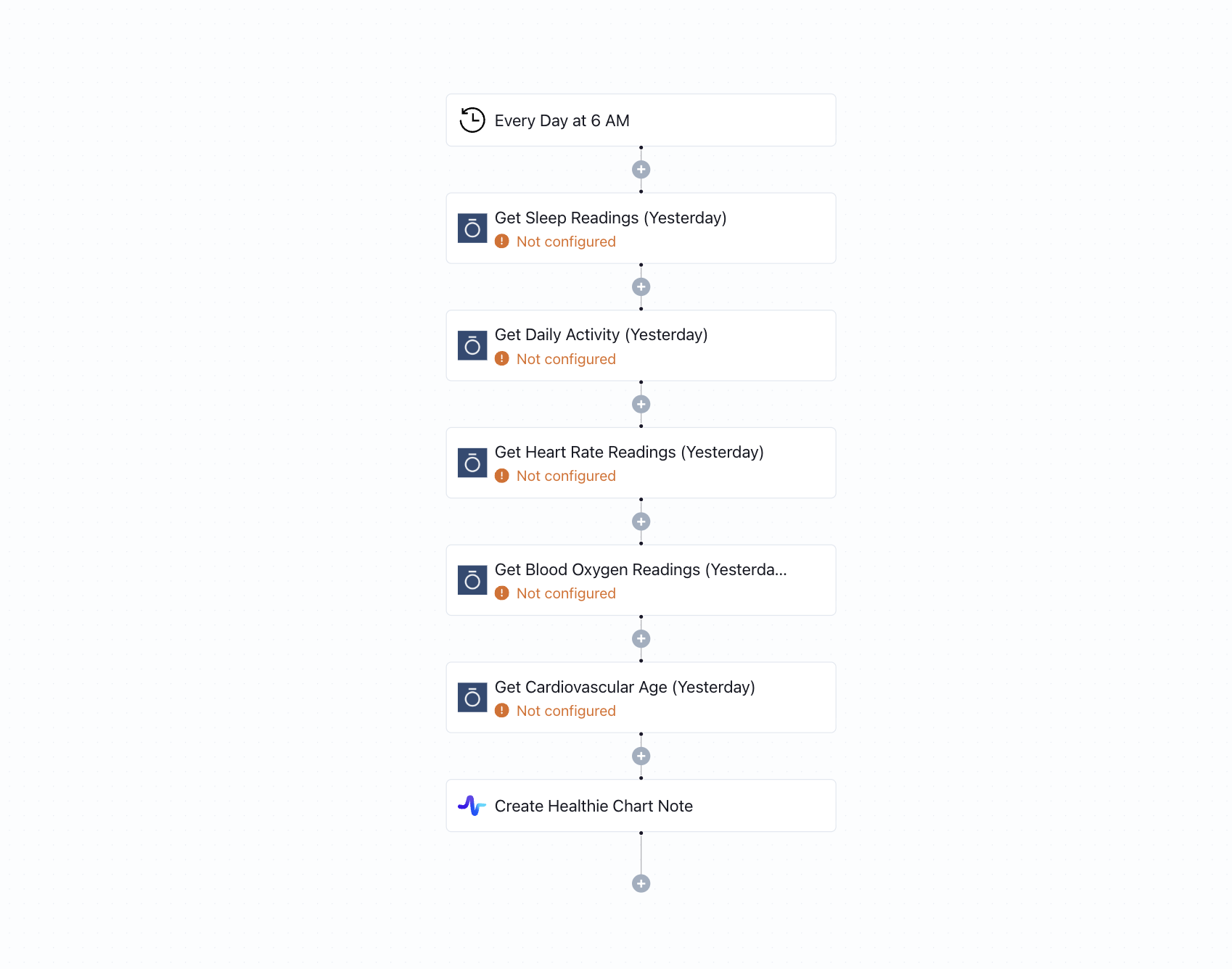
Triggered on a daily schedule, this automation collects biometric and lifestyle data from a patient’s Oura Ring. It fetches metrics including daily activity, sleep scores, heart rate, blood oxygen levels, and cardiovascular age routes for the previous day. These readings are then compiled into a structured note and automatically added to the patient’s Healthie chart using the “Create chart note” action-ensuring the care team has up-to-date physiological insights without needing to manually log or import wearable data.

Why it matters

Continuous monitoring helps clinicians identify health trends, intervene early, and personalize care-especially for chronic care patients or those in remote wellness programs. This workflow enables passive data collection from Oura Ring and ties it directly into your EHR documentation process. It saves time, eliminates data silos, and ensures your patient’s vitals and lifestyle insights are always visible during care planning.

Who this is for

Designed for clinicians, health coaches, and care coordinators managing patients who use Oura Rings. It’s especially useful for remote care teams, functional medicine practices, and digital health programs looking to incorporate biometric data into their clinical workflows via Healthie.

Key benefits

• Automatically syncs Oura Ring data to patient charts daily
• Centralizes wellness, sleep, and vitals data in Healthie for easy access
• Supports trend analysis and remote monitoring with zero manual entry
• Enhances personalized care with daily, real-time health insights
• Fully no-code, secure, and easy to configure for specific patients

How the template works

1
Click 'Try it now'
This will copy the template into your Keragon account. If you don't have an account, you will be prompted to create one for free.
2
Customize your workflow
You can now connect your accounts, add steps, test with your data, and adjust the configuration based on your needs.
3
Publish your workflow
Once you've customized the template to your need, you can one-click publish the app and begin automating.

Creator

Integration

Categories

EHR Data Sync

FAQ

No items found.

Daily Oura-to-Healthie Sync: Auto-Log Wearable Vitals in Patient Chart

Try it now