✨ Keragon AI is live. Build workflows from plain English
Read more

AdvancedMD to Spruce Health: Appointment-Based Messaging

AdvancedMD to Spruce Health: Appointment-Based Messaging

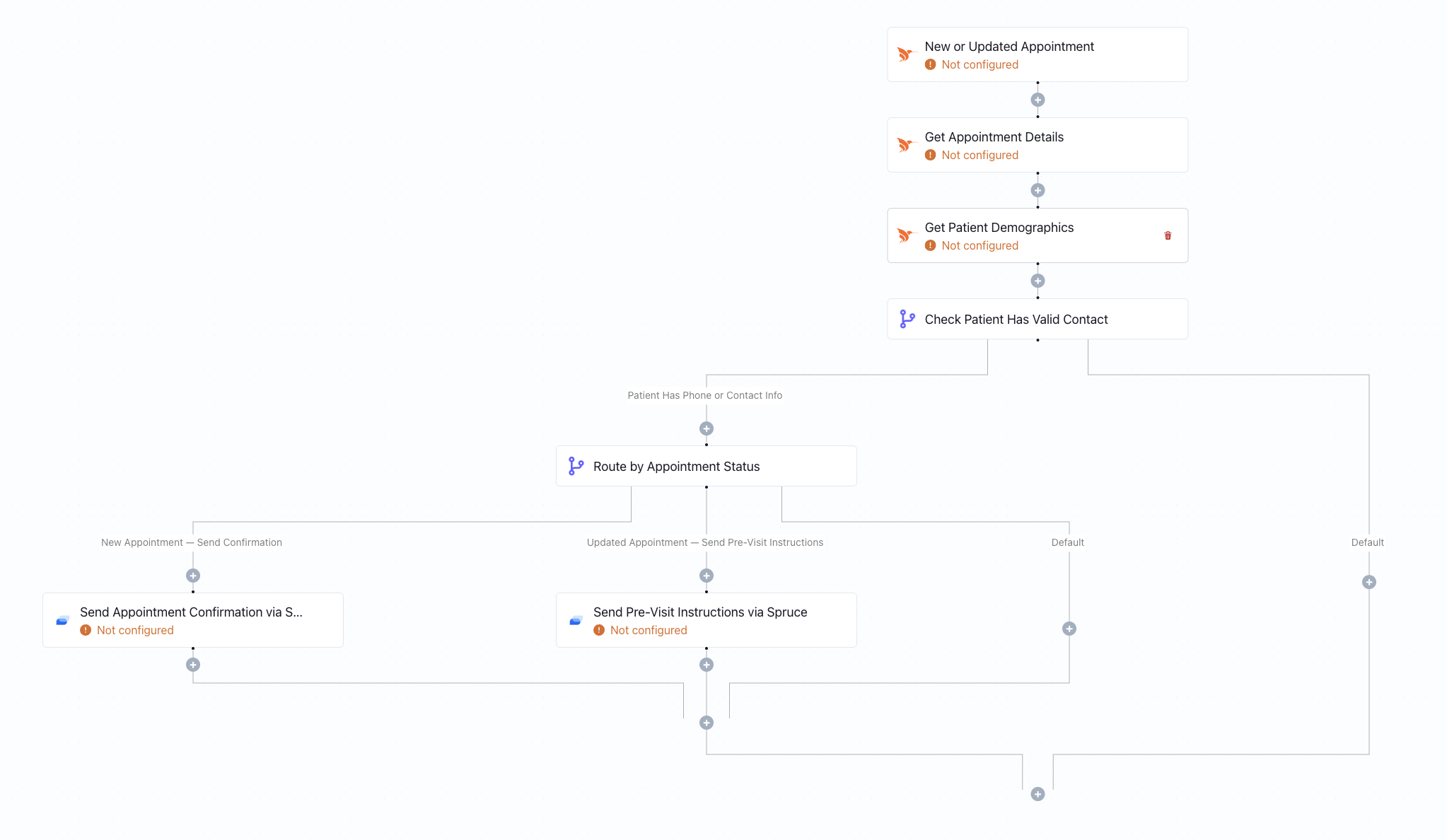
When an appointment is created or updated in AdvancedMD, this workflow automatically finds the patient in Spruce Health and sends them a message - no manual outreach required.

What this workflow does

This workflow is triggered whenever a new appointment is created or an existing appointment is updated in AdvancedMD. Once triggered, it searches for the corresponding patient contact in Spruce Health using identifying information (such as name, phone number, or email).

If a matching contact is found in Spruce, the workflow automatically sends a message to the patient through Spruce Health. This message can be used for appointment confirmations, updates, reminders, or follow-ups based on the appointment details received from AdvancedMD.

The automation ensures that appointment activity inside your EHR immediately drives patient communication - without staff needing to manually copy information or send separate messages.

Why it matters

Appointment changes happen constantly - new bookings, reschedules, and updates. Manually tracking these changes and reaching out to patients is time-consuming and prone to delays.

By connecting AdvancedMD directly to Spruce Health, this workflow ensures patients receive timely, consistent communication tied directly to their appointment record. It reduces front-desk workload, improves patient engagement, and minimizes missed appointments caused by communication gaps.

Who this is for

This template is designed for practices using AdvancedMD as their EHR/PM system and Spruce Health for patient communication. It’s ideal for front-desk teams, care coordinators, and operations managers who want appointment-driven messaging to happen automatically without relying on manual processes.

Key benefits

• Automatically trigger patient messages from appointment activity
• Reduce front-desk time spent on manual confirmations and updates
• Improve patient communication consistency
• Minimize no-shows with real-time outreach
• Keep EHR scheduling and messaging platforms fully aligned

How the template works

1
Click 'Try it now'
This will copy the template into your Keragon account. If you don't have an account, you will be prompted to create one for free.
2
Customize your workflow
You can now connect your accounts, add steps, test with your data, and adjust the configuration based on your needs.
3
Publish your workflow
Once you've customized the template to your need, you can one-click publish the app and begin automating.

Creator

Categories

Patient Communication

FAQ

No items found.

AdvancedMD to Spruce Health: Appointment-Based Messaging

Try it now