🎉 We've raised a total of $10.5M to bring automation to healthcare. Read more.  

AthenaHealth to Paubox Patient Sync Automation

AthenaHealth to Paubox Patient Sync Automation

Automatically syncs patient records between AthenaHealth and Paubox to keep healthcare marketing lists up to date with every patient add, update, or deletion.
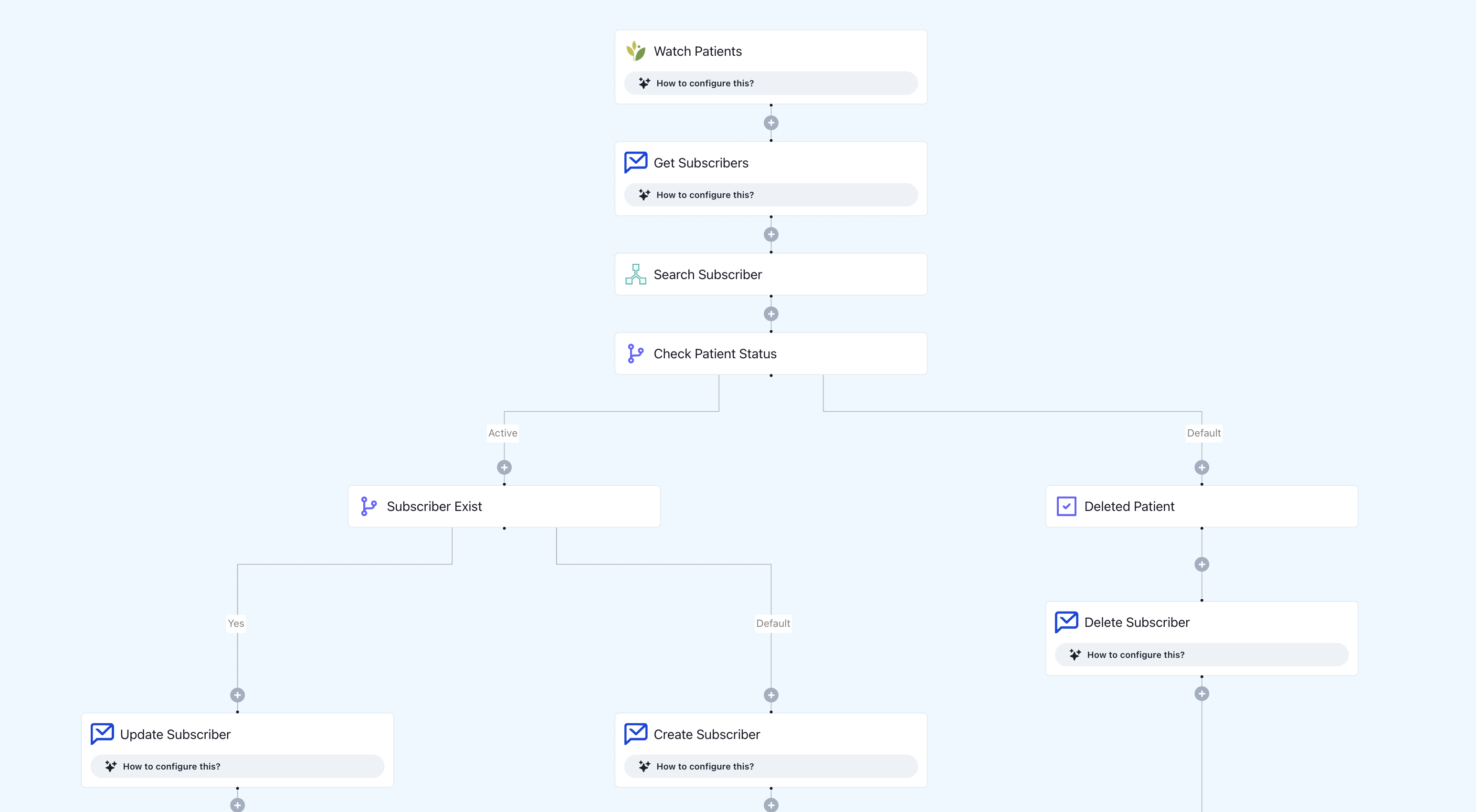
What this workflow does

  • Trigger: Watch Patients module in AthenaHealth (new, updated, or deleted).
  • Logic:
    • When a new patient is added → create a new subscriber in Paubox Marketing.
    • When a patient record is updated → find the corresponding subscriber in Paubox and update their details.
    • When a patient is deleted → find and remove the matching subscriber from Paubox.

Why it matters

Healthcare teams often maintain separate systems for clinical records and marketing communications. This automation eliminates manual syncing, ensuring that every patient’s marketing permissions and communication status match their latest clinical profile in AthenaHealth.

Who this is for

Designed for healthcare teams using AthenaHealth for EHR and Paubox for HIPAA-compliant marketing communication who want to:

  • Keep mailing lists current and compliant
  • Prevent sending campaigns to inactive/deleted patients
  • Streamline admin work between marketing and medical teams

Key benefits

  • Real-time sync of AthenaHealth patient changes with Paubox subscriber list
  • Automatically adds, updates, or removes patients without manual action
  • Reduces HIPAA compliance risk by maintaining accurate communication lists
  • Saves staff hours otherwise spent cross-checking systems
  • Fully automated and auditable via Keragon

How the template works

1
Click 'Try it now'
This will copy the template into your Keragon account. If you don't have an account, you will be prompted to create one for free.
2
Customize your workflow
You can now connect your accounts, add steps, test with your data, and adjust the configuration based on your needs.
3
Publish your workflow
Once you've customized the template to your need, you can one-click publish the app and begin automating.

Creator

Categories

Patient Communication

FAQ

What happens if a patient’s email already exists in Paubox?

The workflow detects duplicates via search and performs an update instead of creating a new subscriber.

Can this flow handle multiple AthenaHealth instances?

Yes, by duplicating and adjusting the initial trigger connection, you can support multi-practice setups.

What data fields sync automatically?

First Name, Last Name, and Email.

AthenaHealth to Paubox Patient Sync Automation

Try it now

Other related templates

No related template (yet!)
See all our templates