


Healthcare Booking Automation
Jotform booking submitted → Google Calendar blocked, Drive organized, Sheets logged. Instantly.
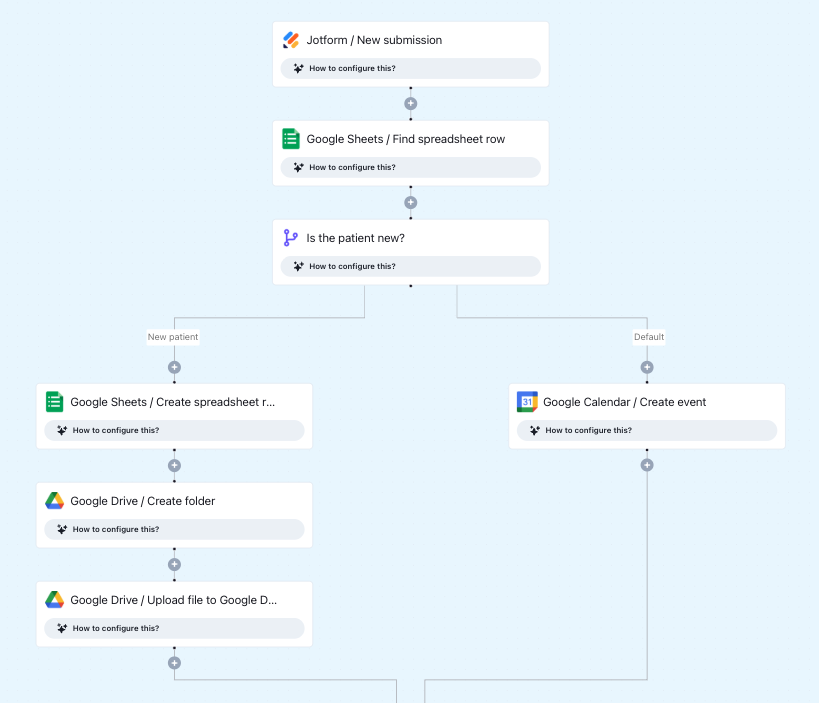
Click to expand
How the automation runs
- A patient or client submits a booking form via Jotform
- Keragon creates a Google Calendar event for the appointment using the submitted details
- A dedicated Google Drive folder is created or organized with the booking documents
- The booking details are logged to Google Sheets for tracking and reporting
- All three actions complete automatically within seconds of submission
Is this for you ?
- You use Jotform for bookings and rely on Google Workspace (Calendar, Drive, Sheets) to run your operations
- Your team spends time after each submission doing manual calendar and file management
- You want a single form submission to trigger all downstream actions automatically
- You're a solo provider, health coach, or small clinic managing bookings without a full admin team





More templates by
Autotetra
More
Appointment Scheduling
templates
Related templates





























FAQ
No items found.