Patient Intake
Jotform to Healthie Patient Intake Sync
Every Jotform submission lands in Healthie. New patient or returning, handled automatically.
Jotform
→
Keragon
→
Healthie
You're copying patient data from Jotform into Healthie by hand. Every. Single. Submission.
Who this is for
This template is built fo you if:
- You use Jotform for patient intake and Healthie as your EHR
- You or your staff are manually re-entering form submissions into patient profiles
- Duplicate patient records have caused confusion or errors in your Healthie account
- You want a no-code intake solution that works out of the box, without technical setup

How it works
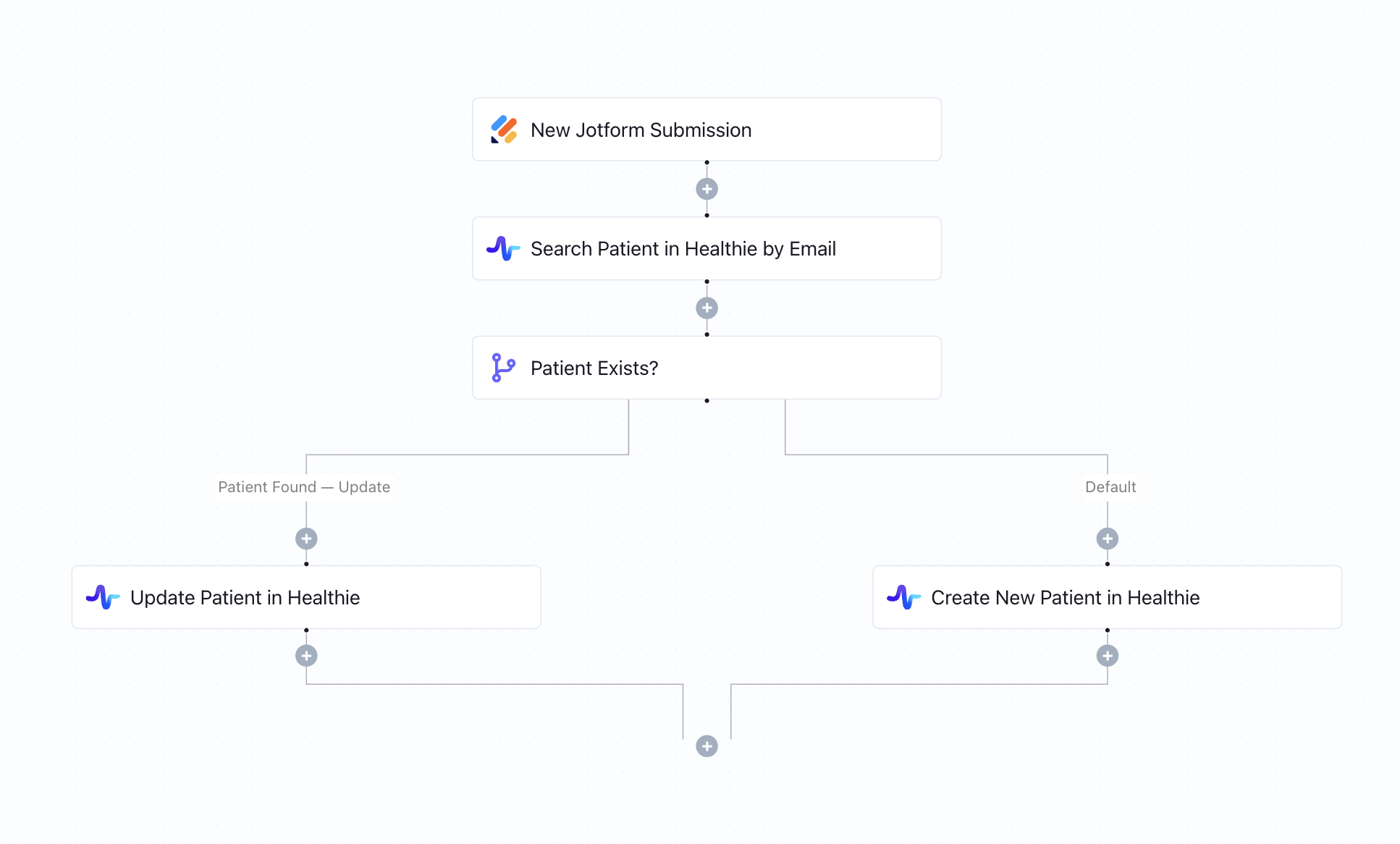
- A patient submits your Jotform intake form
- Keragon searches Healthie for the patient using their email or unique identifier
- If the patient already exists, their Healthie profile is updated with the latest form data
- If no match is found, a new patient record is created in Healthie
- Both paths run instantly, with zero manual intervention
Key benefits
- No duplicate patient records — returning patients are always recognized
- New patient profiles created automatically from every intake submission
- Existing records stay current with each new form update
- Fully HIPAA-compliant and configurable in minutes
How to get started
1
Click “Run this workflow”
You’ll be prompted to sign up or log in to your Keragon account. Once inside, you’ll land on your dashboard with a pre-filled prompt in the AI chat.
2
Generate the workflow with AI
Click the CTA in the chat to let Keragon AI build the workflow for you automatically - no manual setup needed.
3
Review and publish
Once the workflow is generated, configure and review it in the canvas, then publish with one click. Your automation will start running immediately.
Your AI prompt
This prompt will be automatically loaded in Keragon AI. Simply run it to generate your workflow, or copy and customize it first.
I use Jotform for patient intake forms and Healthie as my EHR.
When a new Jotform submission is received, search for the patient in Healthie using their email (or another unique identifier from the form).
If the patient already exists, update their profile in Healthie with the latest information from the form submission.
If the patient does not exist, create a new patient record in Healthie using the submitted data.
Make sure the workflow clearly handles both branches (existing vs new patient) to avoid duplicate records.
I use Jotform for patient intake forms and Healthie as my EHR.
When a new Jotform submission is received, search for the patient in Healthie using their email (or another unique identifier from the form).
If the patient already exists, update their profile in Healthie with the latest information from the form submission.
If the patient does not exist, create a new patient record in Healthie using the submitted data.
Make sure the workflow clearly handles both branches (existing vs new patient) to avoid duplicate records.
Square to Tebra Appointment Sync
AdvancedMD to Spruce Health: Appointment-Based Messaging
Jotform to Zenoti Appointment Scheduling
Jotform to Cerbo Patient Encounters
Healthcare Booking Automation
Typeform to Canvas Medical Patient Intake Sync
Related templates
AdvancedMD to Spruce Health: Appointment-Based Messaging
Jotform to Canvas Medical Patient Intake Sync
Jotform to Charm Health Patient Intake Sync