We've raised a total of $10.5M to bring automation to healthcare.
Read more

Jotform to Open Dental Patient Intake Sync

Jotform to Open Dental Patient Intake Sync

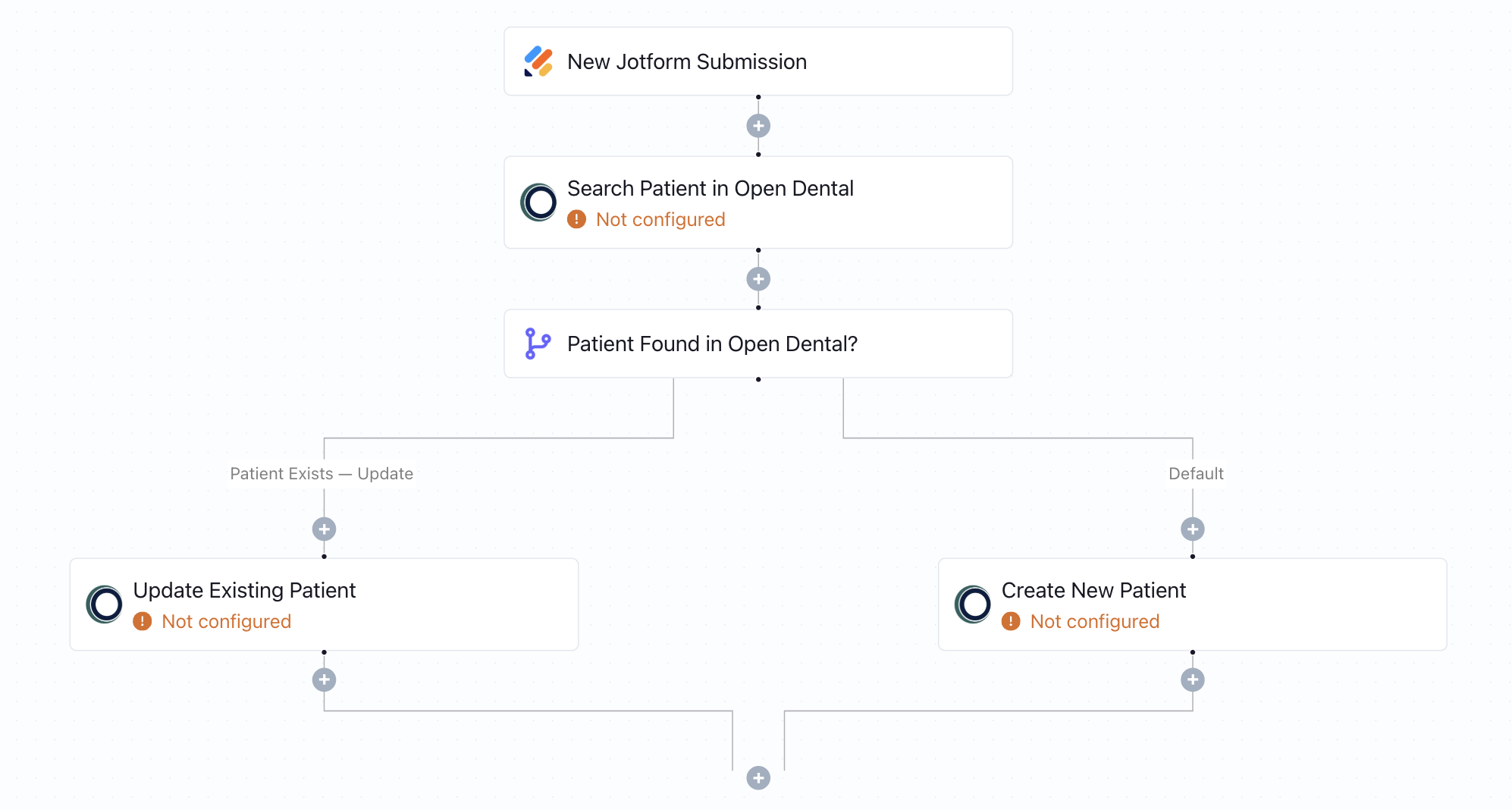
When a patient submits a Jotform, this workflow checks if they already exist in OpenDental. It updates existing records or creates a new one - no manual data entry needed.
What this workflow does

This workflow captures patient intake data from a Jotform and syncs it with Open Dental. When a new submission is received, it first checks Open Dental to see if a matching patient record already exists. If the patient is found, their existing profile is updated with the latest details. If no match is found, a new patient is created automatically - ensuring every submission results in a clean and current dental record.

Why it matters

Manual data transfer from intake forms into Open Dental is not only time-consuming but prone to mistakes and duplicate records. This automation eliminates that risk by making sure patient data flows directly into your practice management system in real time, improving accuracy and reducing administrative workload.

Who this is for

This template is designed for dental practices that use Jotform to collect patient data and Open Dental as their practice management system. It’s especially valuable for front-desk teams and office managers who want to streamline patient onboarding and eliminate repetitive tasks - no developers or IT help needed.

Key benefits

• Automatically create or update patients in Open Dental from Jotform
• Eliminate duplicate records and reduce entry errors
• Keep patient information accurate and up to date in real time
• Save hours of manual data processing each week
• Fully HIPAA-compliant and easy to configure with no coding required

How the template works

1
Click 'Try it now'
This will copy the template into your Keragon account. If you don't have an account, you will be prompted to create one for free.
2
Customize your workflow
You can now connect your accounts, add steps, test with your data, and adjust the configuration based on your needs.
3
Publish your workflow
Once you've customized the template to your need, you can one-click publish the app and begin automating.

Creator

Categories

Appointment Scheduling

FAQ

No items found.

Jotform to Open Dental Patient Intake Sync

Try it now