We've raised a total of $10.5M to bring automation to healthcare.
Read more

Jotform to Canvas Medical Patient Intake Sync

Jotform to Canvas Medical Patient Intake Sync

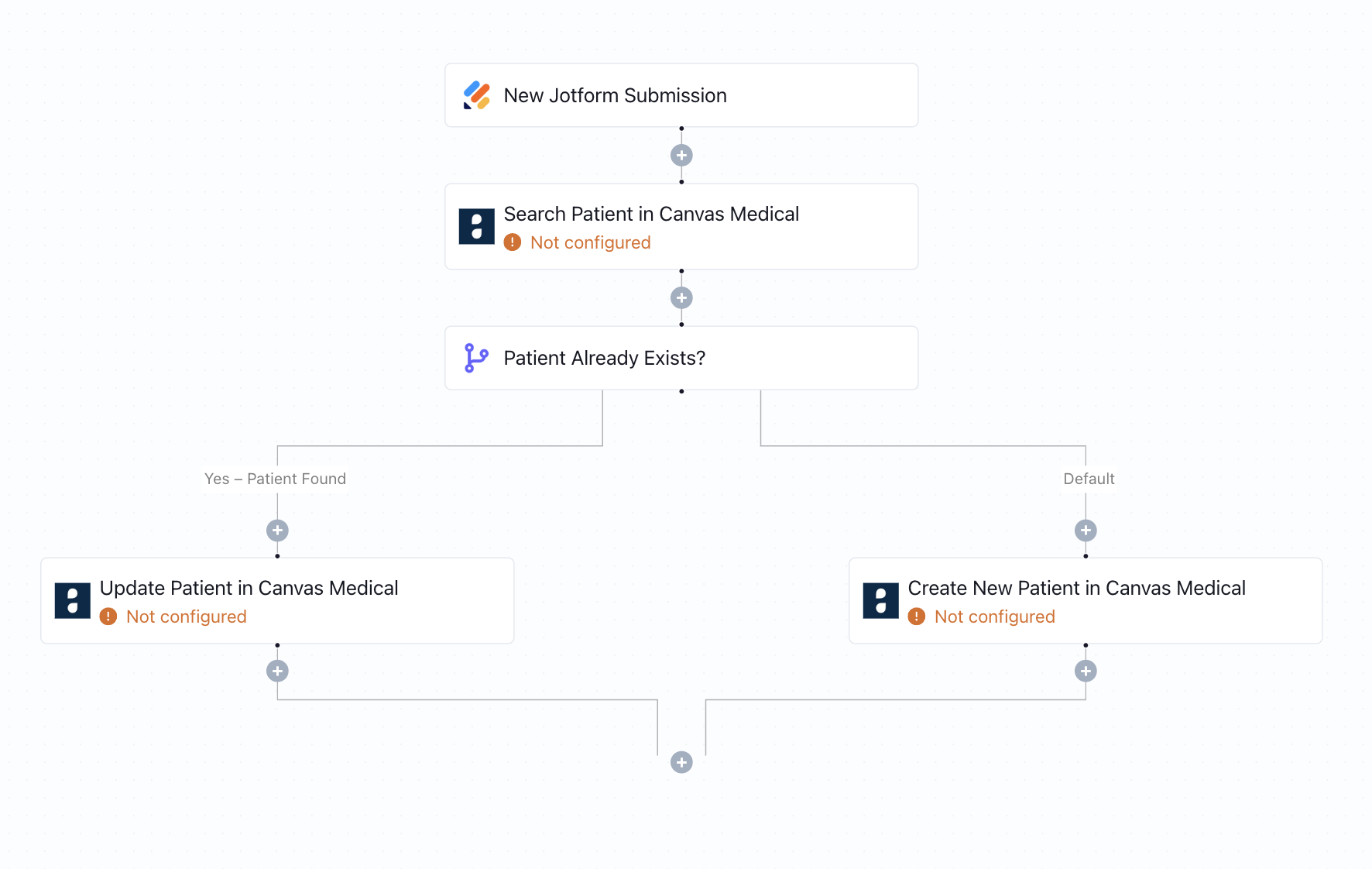
When a patient submits a Jotform, this workflow checks if they already exist in Canvas Medical. It updates existing records or creates a new one - no manual data entry needed.
What this workflow does

This workflow automates patient syncing between Jotform and Canvas Medical. Upon receiving a new Jotform submission, it searches Canvas Medical to determine whether the patient already exists:

  • If the patient is found, their existing record is updated with the new form data.
  • If not, a new patient profile is created automatically.

This ensures that both new and returning patients are accurately captured in your EHR system with no manual intervention.

Why it matters

Manual patient record management is slow and error-prone, especially during high intake periods. This automation removes administrative bottlenecks by keeping Canvas Medical up to date in real time, improving accuracy, speeding up onboarding, and allowing clinical teams to stay focused on care - not data entry.

Who this is for

This template is designed for startups, digital clinics, and care teams that use Canvas Medical as their clinical operating system and Jotform for capturing patient intake. It’s a plug-and-play solution for automating intake workflows - ideal for practices with lean ops teams.

Key benefits

• Automatically update or create patients in Canvas Medical from Jotform
• Reduce risk of duplicates and outdated patient information
• Streamline patient onboarding for new and returning patients
• Save administrative time and reduce overhead
• Fully HIPAA-compliant—no coding required

How the template works

1
Click 'Try it now'
This will copy the template into your Keragon account. If you don't have an account, you will be prompted to create one for free.
2
Customize your workflow
You can now connect your accounts, add steps, test with your data, and adjust the configuration based on your needs.
3
Publish your workflow
Once you've customized the template to your need, you can one-click publish the app and begin automating.

Creator

Categories

Appointment Scheduling

FAQ

No items found.

Jotform to Canvas Medical Patient Intake Sync

Try it now