✨ Keragon AI is live. Build workflows from plain English
Read more

Square to Tebra Appointment Sync

Square to Tebra Appointment Sync

When a booking is created in Square, this workflow checks if the customer already exists in Tebra, creates or updates their patient record, and automatically schedules the corresponding appointment - no manual data entry required.

What this workflow does

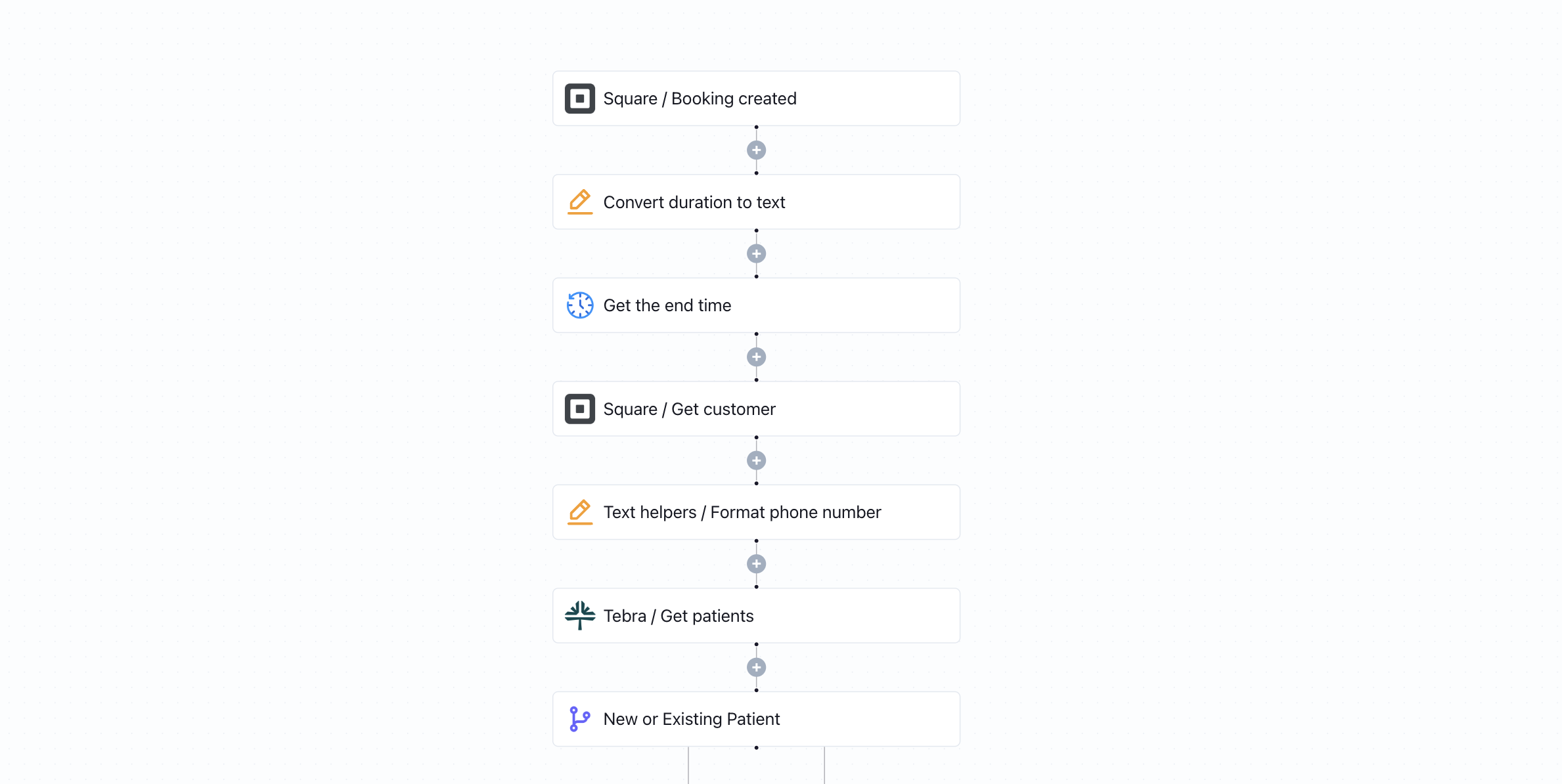
This workflow is triggered whenever a new booking is created in Square. It begins by converting the appointment duration into text and calculating the appointment end time to ensure accurate scheduling details. The workflow then retrieves the customer record from Square and formats the phone number to match Tebra’s required structure.

Next, it searches for an existing patient in Tebra (formerly Kareo) using the customer’s identifying details, typically phone number or name. A conditional step determines whether the patient already exists:

  • If the patient is new:
    The workflow creates a new patient record in Tebra and then schedules the appointment under that newly created profile.
  • If the patient already exists:
    The workflow converts any necessary text fields (such as IDs) into numeric format, updates the existing patient’s information to reflect the latest data from Square, and then creates a new appointment tied to their existing chart.

This ensures that every Square booking results in an accurate and properly linked patient appointment inside Tebra - without duplicates.

Why it matters

Manually transferring appointment data from Square into your EHR creates unnecessary administrative work and increases the risk of duplicate patient records or scheduling errors. This workflow keeps your scheduling and clinical systems aligned in real time. Whether the patient is brand new or returning, their information is correctly structured, updated, and connected to the right chart automatically.

Who this is for

This template is designed for private practices, medical spas, therapy clinics, and outpatient providers who use Square for online booking and Tebra (Kareo) as their EHR and practice management system. It’s ideal for teams looking to streamline front-desk operations, reduce manual scheduling tasks, and maintain clean patient records without relying on custom integrations.

Key benefits

• Automatically sync Square bookings into Tebra in real time
• Prevent duplicate patient records with built-in new vs. existing logic
• Ensure properly formatted phone numbers and appointment durations
• Eliminate manual data entry between scheduling and EHR systems
• Keep patient demographics up to date at every booking

How the template works

1
Click 'Try it now'
This will copy the template into your Keragon account. If you don't have an account, you will be prompted to create one for free.
2
Customize your workflow
You can now connect your accounts, add steps, test with your data, and adjust the configuration based on your needs.
3
Publish your workflow
Once you've customized the template to your need, you can one-click publish the app and begin automating.

Creator

Categories

Appointment Scheduling

FAQ

No items found.

Square to Tebra Appointment Sync

Try it now