We've raised a total of $10.5M to bring automation to healthcare.
Read more

Optimantra to Jotform Real-Time Calendar Sync

Optimantra to Jotform Real-Time Calendar Sync

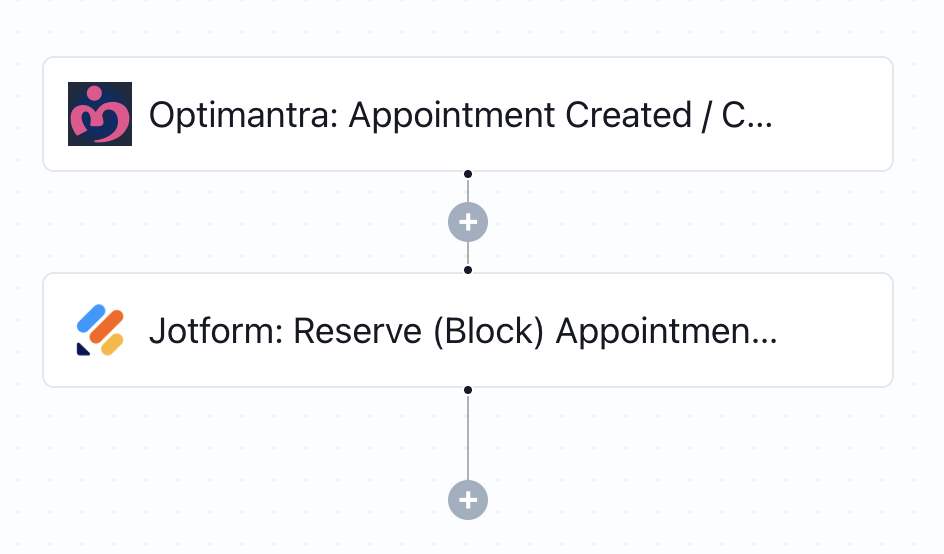
Whenever a new appointment is booked in Optimantra, this workflow instantly reserves the same time slot in your Jotform calendar - preventing double bookings automatically.
What this workflow does

This workflow ensures your public-facing Jotform appointment slots stay in perfect sync with your internal Optimantra calendar. It begins with a generic trigger from Optimantra (e.g., a new appointment or schedule update). Once triggered, it automatically reserves the corresponding time slot in your Jotform scheduling form, making that time unavailable to other patients.

Why it matters

Without real-time calendar sync, practices risk double-booking patients or offering unavailable time slots - creating a frustrating patient experience and unnecessary admin cleanup. This automation solves that by keeping your internal and public calendars aligned 24/7 with no manual oversight.

Who this is for

This template is ideal for integrative clinics, wellness providers, and scheduling admins using Optimantra for internal scheduling and Jotform for patient-facing appointment requests. It’s perfect for any team that wants to maintain accurate, up-to-date availability without juggling two calendars.

Key benefits

• Prevent double bookings with real-time calendar sync
• Automatically block time slots on Jotform when booked in Optimantra
• Improve patient experience with accurate availability
• Eliminate manual updates across scheduling platforms
• Easy to implement - no code or developer needed

How the template works

1
Click 'Try it now'
This will copy the template into your Keragon account. If you don't have an account, you will be prompted to create one for free.
2
Customize your workflow
You can now connect your accounts, add steps, test with your data, and adjust the configuration based on your needs.
3
Publish your workflow
Once you've customized the template to your need, you can one-click publish the app and begin automating.

Creator

Categories

Appointment Scheduling

FAQ

No items found.

Optimantra to Jotform Real-Time Calendar Sync

Try it now