


Athenahealth to GoHighLevel Appointment Sync
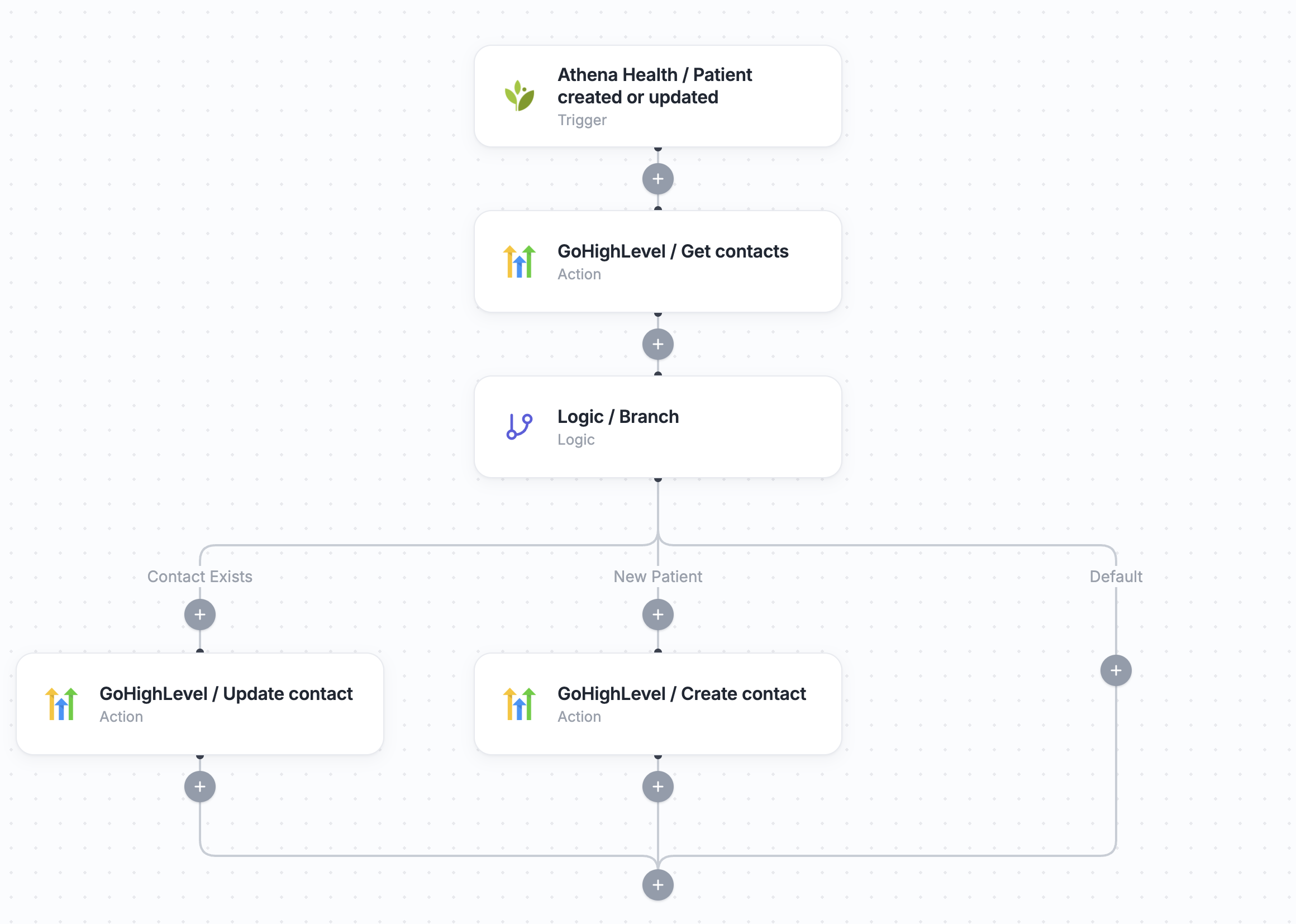
When an appointment is created or updated in Athenahealth, this workflow pulls the full appointment and patient details, then checks GoHighLevel for a matching contact. If the patient already exists, their CRM record is updated with the latest appointment information. If not, a new contact is created — so your clinical and marketing teams always work from the same up-to-date patient data.
Click to expand
How the automation runs
- A new appointment is created or updated in Athenahealth
- Keragon retrieves the full appointment and patient details
- The workflow checks if the patient already exists as a contact in GoHighLevel
- If found, their CRM contact is updated with the latest appointment information
- If not, a new contact is created in GoHighLevel with the patient and appointment data
Is this for you ?
This workflow is built for teams running clinical care in Athenahealth and marketing or sales in GoHighLevel.
- You use Athenahealth as your EHR and GoHighLevel for CRM and marketing automation
- Your team manually re-enters appointment and patient data between your EHR and your CRM
- You want your sales and care teams working from the same up-to-date patient records
- You're a clinic or practice running both clinical and marketing ops that need to stay connected



More templates by
Keragon
More
Appointment Scheduling
templates































FAQ
No items found.