We've raised a total of $10.5M to bring automation to healthcare.
Read more

Jotform to AdvancedMD Appointment Scheduling

Jotform to AdvancedMD Appointment Scheduling

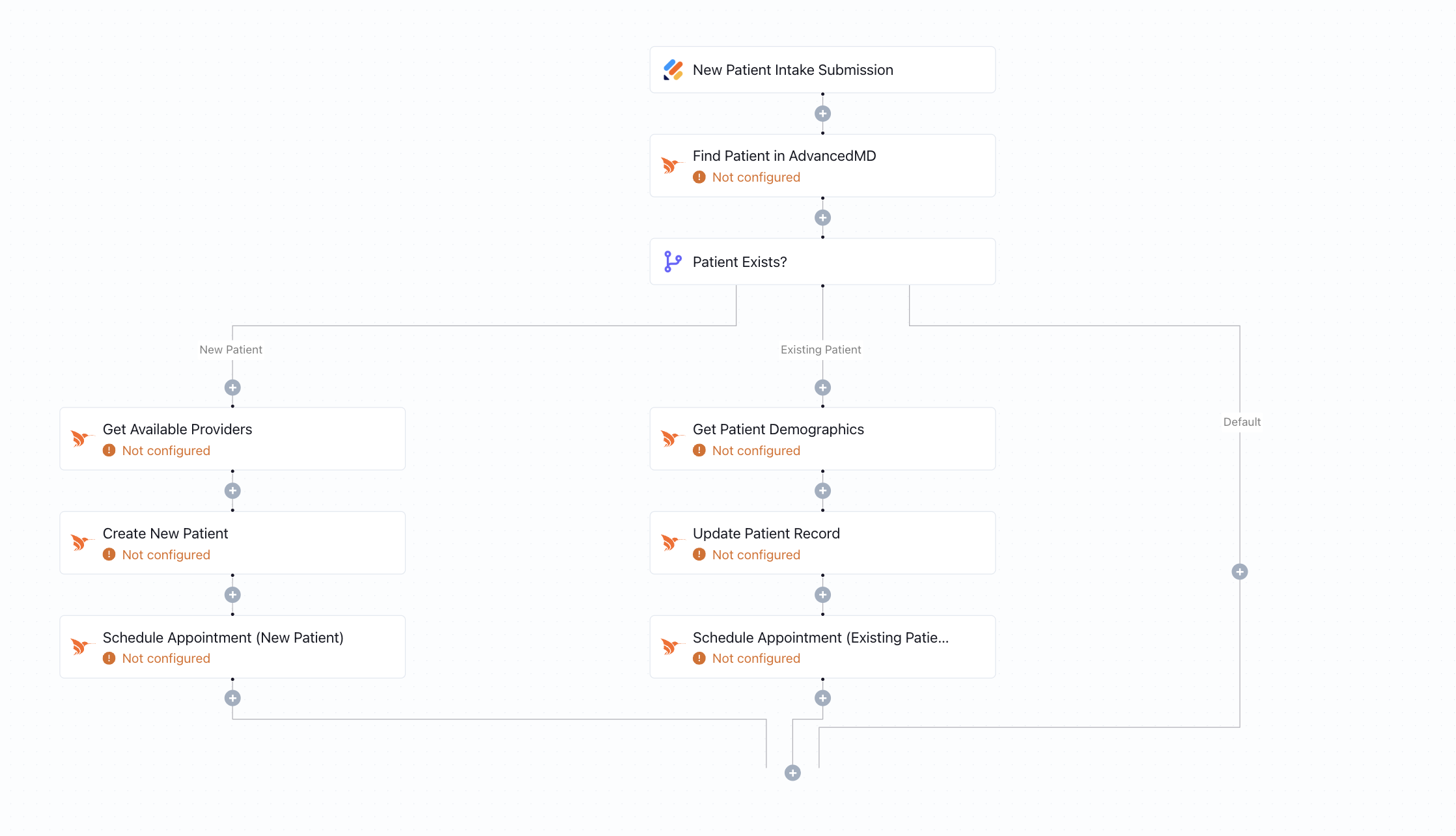
When a patient submits a Jotform, this workflow checks if they exist in AdvancedMD. It creates or updates their profile and schedules an appointment automatically - no manual entry needed.
What this workflow does

This workflow automates the full intake-to-scheduling process by syncing Jotform submissions with AdvancedMD. Once a new form is submitted, the system checks if the patient already exists in AdvancedMD.

  • If the patient is new, the workflow fetches available providers, creates the patient profile, and immediately schedules an appointment.
  • If the patient already exists, the workflow converts their ID for formatting compatibility, retrieves their existing record, and books the new appointment directly.

Why it matters

Front-desk teams spend hours juggling intake forms, verifying existing patients, and managing appointment scheduling. This workflow eliminates those manual steps by turning every Jotform submission into an actionable update in AdvancedMD - reducing scheduling friction and ensuring no patient falls through the cracks.

Who this is for

This template is built for front-desk staff, intake coordinators, and small practices that use Jotform for pre-visit forms and AdvancedMD as their EHR and scheduling system. It's perfect for clinics looking to boost operational efficiency and streamline patient onboarding.

Key benefits

• Instantly create or update patients in AdvancedMD from Jotform submissions
• Auto-schedule appointments with the correct provider—no manual lookup
• Eliminate back-and-forth intake and scheduling workflows
• Reduce duplicate data entry and improve record accuracy
• Fully HIPAA-compliant and configurable without technical expertise

How the template works

1
Click 'Try it now'
This will copy the template into your Keragon account. If you don't have an account, you will be prompted to create one for free.
2
Customize your workflow
You can now connect your accounts, add steps, test with your data, and adjust the configuration based on your needs.
3
Publish your workflow
Once you've customized the template to your need, you can one-click publish the app and begin automating.

Creator

Categories

Appointment Scheduling

FAQ

No items found.

Jotform to AdvancedMD Appointment Scheduling

Try it now