


Answer the phone after hours and book the visit
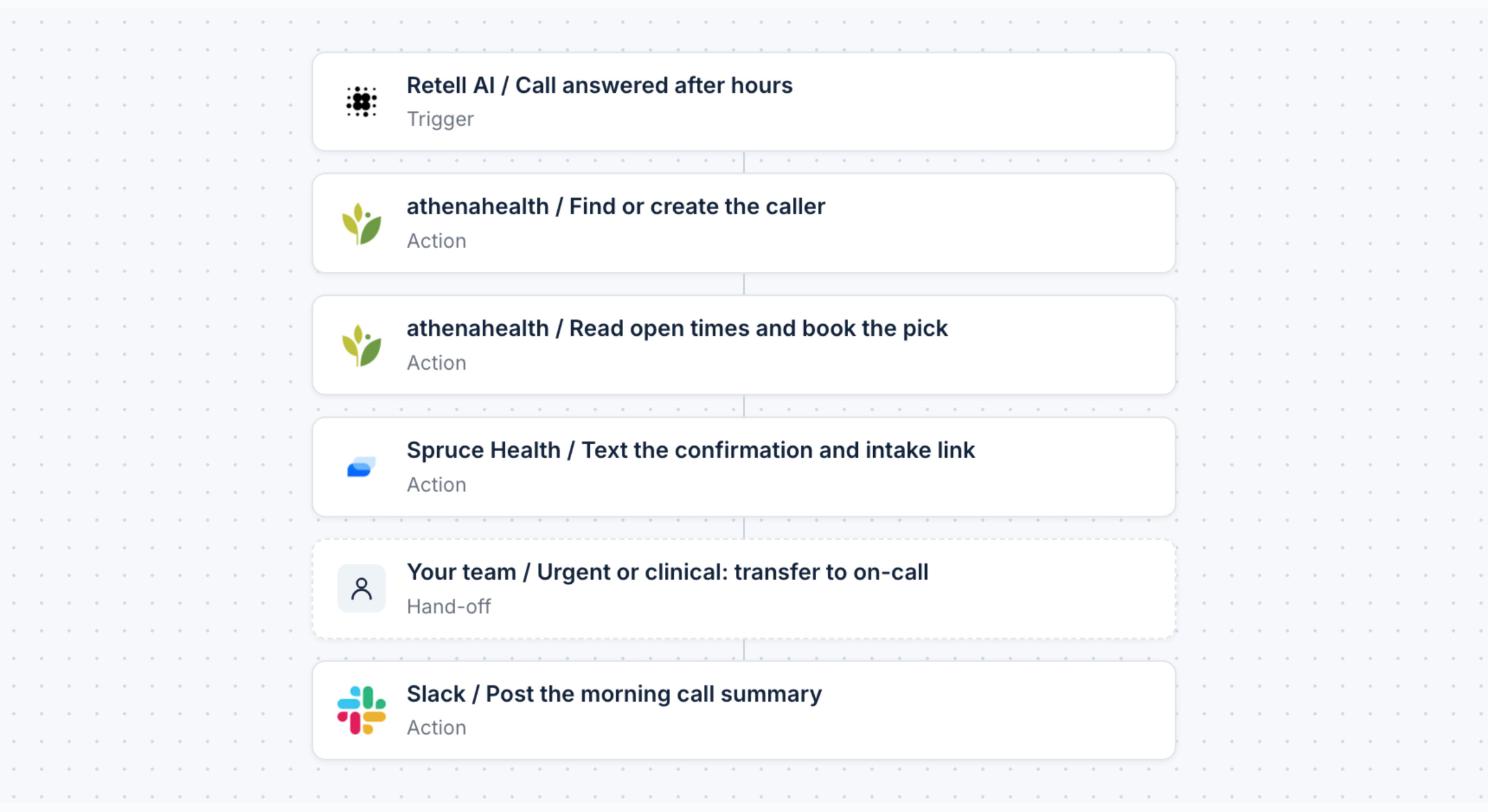
Your voice AI takes the call; this agent finds the caller in your EHR, books a real opening and texts the confirmation.
Who is this for?
Practices that already run a voice AI agent, or plan to, and lose bookings to after-hours and overflow calls.
What problem does it solve?
A voice agent that can talk but cannot book leaves a message for the morning, and many of those callers book elsewhere. This template gives the call a real booking: it finds or creates the patient, books an open time and confirms by text, with anything urgent sent to your on-call line.
How it works
- Your voice AI agent answers the call and sends the caller’s request to Keragon.
- Searches your EHR for the caller by name, date of birth or phone, or creates a new patient.
- Reads open times for the visit type and provider and offers two.
- Books the time the caller picks in your EHR and texts a confirmation and your intake link.
- Transfers anything urgent or clinical to your on-call line with a summary.
- Posts a summary of every call for your front desk by morning.
Setup
- Connect your voice AI agent on Retell AI or Bland.ai, with your greeting and approved answers.
- Connect your EHR and the messaging tool that sends the confirmation.
- Define your office hours, visit types and the facts the agent may answer from.
- Add your on-call number for urgent and clinical calls.
Answer the phone after hours and book the visit
Create an AI receptionist agent for my practice that works with the voice AI agent I connect to answer calls after hours and on overflow. It finds the caller in my EHR or creates a new patient, reads live availability, books the visit they pick, texts a confirmation and my intake link, and leaves my front desk a summary of every call by morning. It answers only from my approved answers, never gives medical advice, and transfers anything urgent or clinical to my on-call line with a summary. Ask me what you need: my EHR, my voice AI agent, my office hours, my visit types and my on-call number.
Make it do more, paste after the prompt
- Follow your escalation rules: when a caller mentions symptoms or urgency, stop scheduling, warm-transfer to on-call and post a summary.
- Text a booking link instead of booking live for callers who prefer it.
- Offer the first available telehealth slot when no in-person time fits.
Frequently asked questions
What do I need to use this template?
- A Keragon account (free 14-day trial, BAA included).
- A voice AI agent on Retell AI or Bland.ai with your greeting and approved answers.
- Your EHR with appointment booking, and a messaging tool for the confirmation.
- Your office hours, visit types, on-call number and the facts the agent may answer from.
Do I need to write code to set this up?
No. Use this template opens your Keragon dashboard with the prompt loaded. Keragon AI asks for what it needs and builds the agent from your answers.
What does it hand to my team?
Every urgent or clinical call, transferred live; a caller who asks for a person; any request the agent cannot match to a visit type or provider.
Can I change what it does?
Yes. Edit the prompt before you send it, or paste a line from the "Make it do more" section, after the prompt.
How is patient data handled?
Keragon is HIPAA-compliant and signs a BAA, included in the free trial. The agent works only with the tools you connect.











More templates you might like


