


Sync invoices and payments to QuickBooks
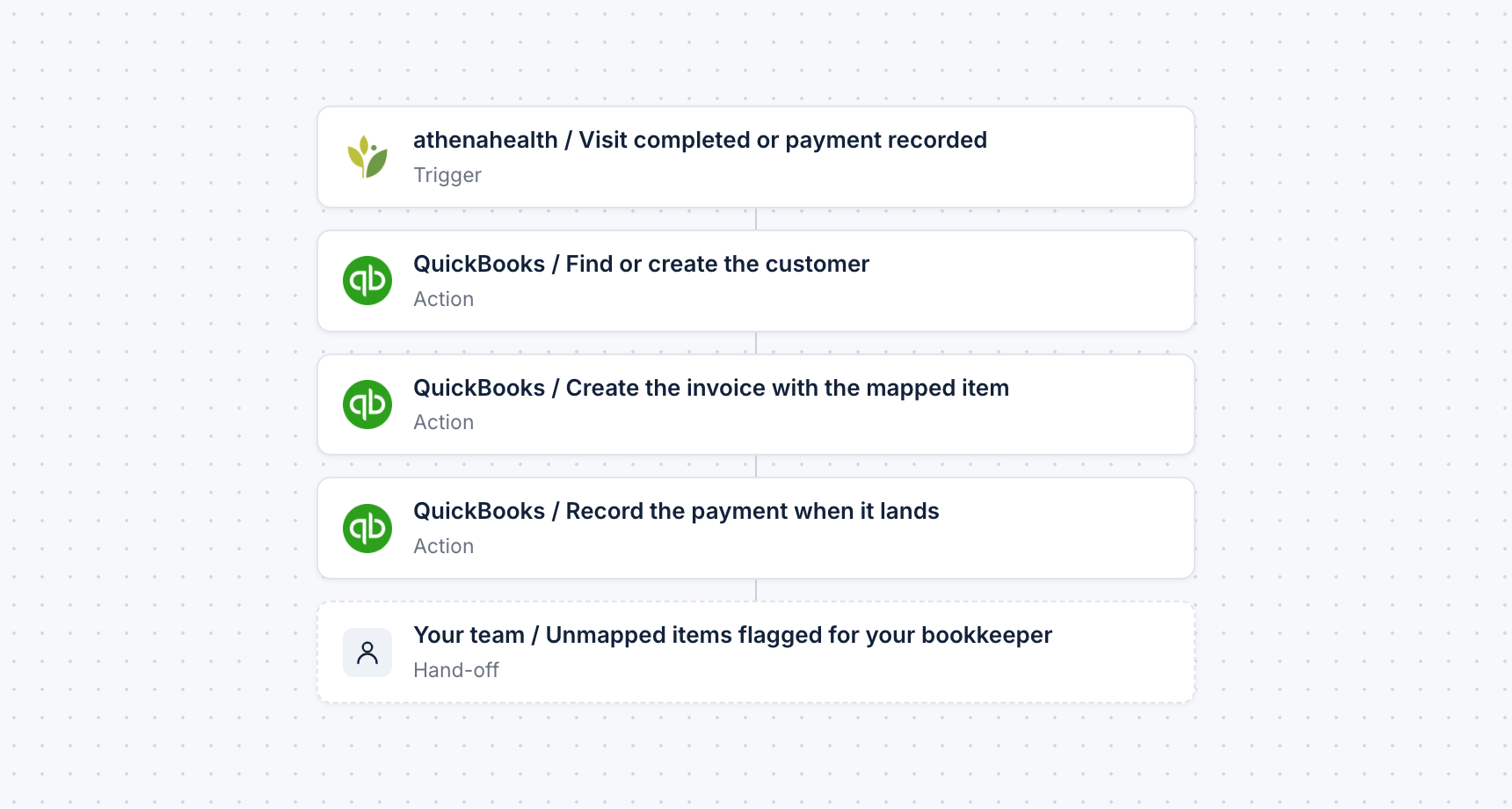
Creates the customer and invoice in QuickBooks when a visit is completed or billed, and records the payment when it lands.
Click to expand
How the automation runs
- A visit is completed, or an invoice, charge or payment is created, in your practice system.
- Finds the customer in QuickBooks by your identifiers, or creates one.
- Creates the invoice with the mapped item and the amount as a number.
- Records the payment against the invoice when it lands.
- Logs every sync and flags any amount or item it cannot map for your bookkeeper.
Is this for you ?
Practices that keep their books in QuickBooks and re-key invoices and payments from the practice system.













More templates by
Keragon
More
Billing & Insurance
templates
Related templates
















































FAQ
What do I need to use this template?
Do I need to write code to set this up?
What does it hand to my team?
Can I change what it does?
How is patient data handled?